
Time Attendance Systems in Brunei
Face and fingerprint terminals installed at your door, with our own software collecting the records.
We supply, install and enrol time attendance terminals across Brunei.
Staff clock in at the terminal. Our software pulls every punch into a database on your PC automatically, and produces the reports.
One page covering the terminals, the software features and sample reports.
Key Features
Complete Attendance Management
- Biometric Fingerprint Staff clock in with their fingerprint, so no one can punch in for someone else.
- RFID Card Access Tap an employee card for a quick, contactless clock-in.
- PIN Code Authentication Clock in with a personal PIN on the terminal keypad.
- Face Recognition (Selected Models) Touch-free clock-in by face on supported terminals.
- Employee Management Keep staff records, departments and enrolment in one place.
- Shift Management Set shift schedules and working hours for each team.
- Attendance Tracking Every clock-in and clock-out is recorded with date and time.
- Late Arrival Monitoring See who arrived late and by how many minutes.
- Early Departure Tracking Spot staff who leave before their shift ends.
- Working Hours Calculation Total hours worked are calculated automatically each day.
- Real‑Time Dashboard See who's in, late or absent today at a glance.
- Daily & Monthly Reports Ready-made daily and monthly attendance summaries.
- Export to Excel / PDF Download reports to print, share or use for payroll.
- Multiple Devices Support Connect several terminals to one system.
- LAN / Multi‑Terminal Network Terminals sync attendance data to your office PC over the network.
What Our Installation Includes
Site visit to agree where each terminal goes
Mounting, power and network for every terminal
Terminal setup: date, time and punch settings
Staff enrolment on site, from your staff list
Wiring to the lock and exit button where the door is also access controlled
Our software installed on your PC and tested against the terminal
Handover session with whoever pulls the reports
1 year hardware warranty
HiFOCUS Attendance Dashboard
Our Own Attendance Software, Included
Every system we install comes with the HiFOCUS Attendance Dashboard, software we build and support ourselves. It runs on a PC in your office, collects punches from your terminals automatically, and turns them into the reports your payroll actually needs. No monthly subscription, and no waiting on a vendor overseas when something needs changing.
Dashboard
Open it in the morning and the day is already summarised: who is present, who is absent, who came in late. A seven-day chart shows attendance across the week, and Recent Activity lists the latest punches as they arrive from every terminal.

Live Feed
Punches appear as they happen, with the time, the employee, the department, whether it was IN or OUT, the method used, and which terminal recorded it. Useful when you're verifying an enrolment or checking that a new terminal is reporting correctly.

Employees and Shifts
One directory of everyone enrolled across all terminals, with enrolment number, department, assigned shift, card number and which authentication methods they've registered.
Shifts are set up as templates: a two-punch shift for drivers, a four-punch shift with lunch for office staff, each with its own grace period. Public holidays are entered once and applied to the shifts they affect, so nobody is marked absent on a holiday.


Attendance Logs and Daily Summary
The full punch history, filterable by date range, device, department, employee or direction. The Daily Summary view turns those punches into a working day per employee: in, lunch out, lunch in, out, total hours, late minutes, early minutes, and a clear flag on any day where a punch is missing and needs correcting.

Reports
Four reports, all using the same calculation as the Daily Summary, so the numbers never disagree:
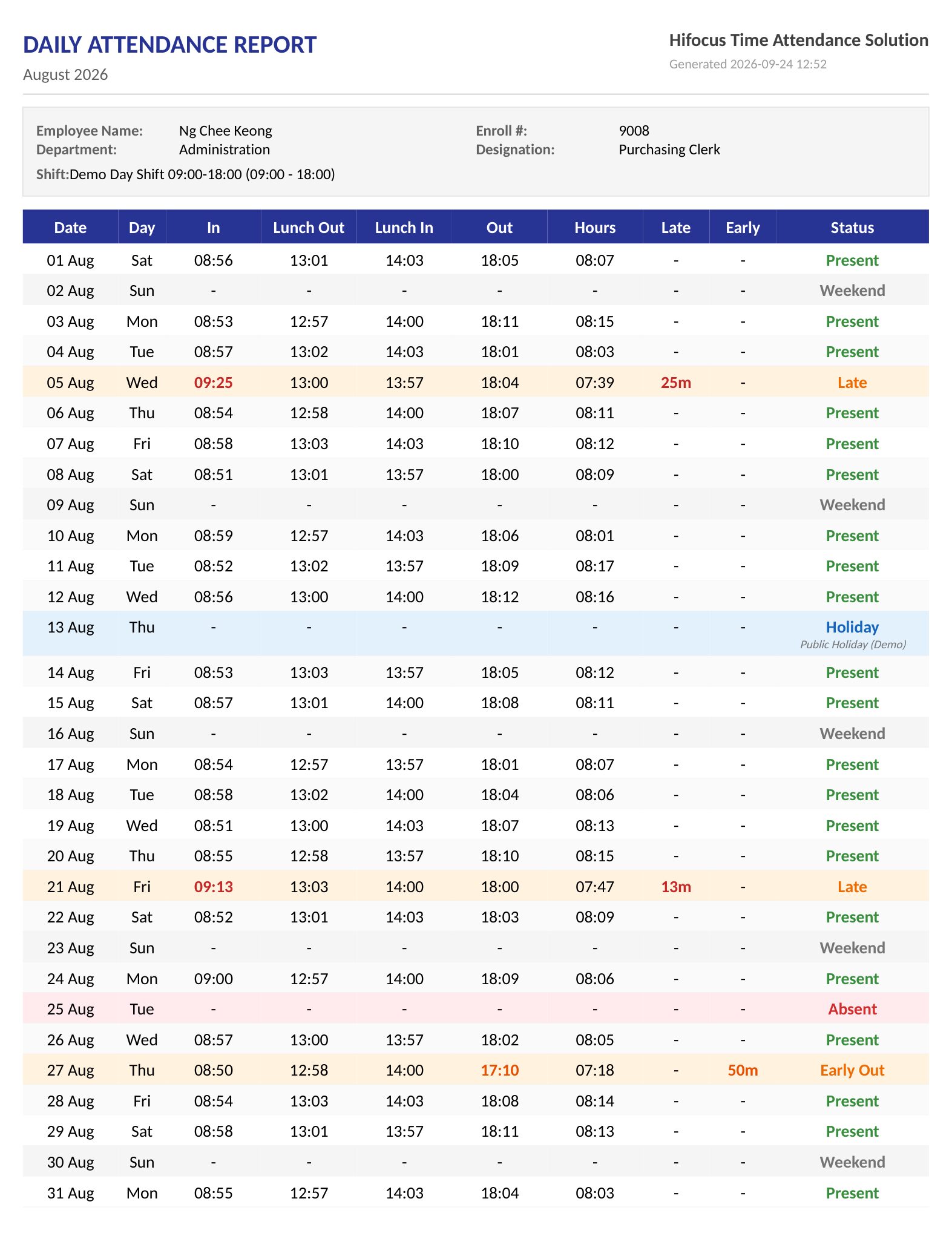
- Daily Attendance — every day for each employee, with punches, hours, late and early
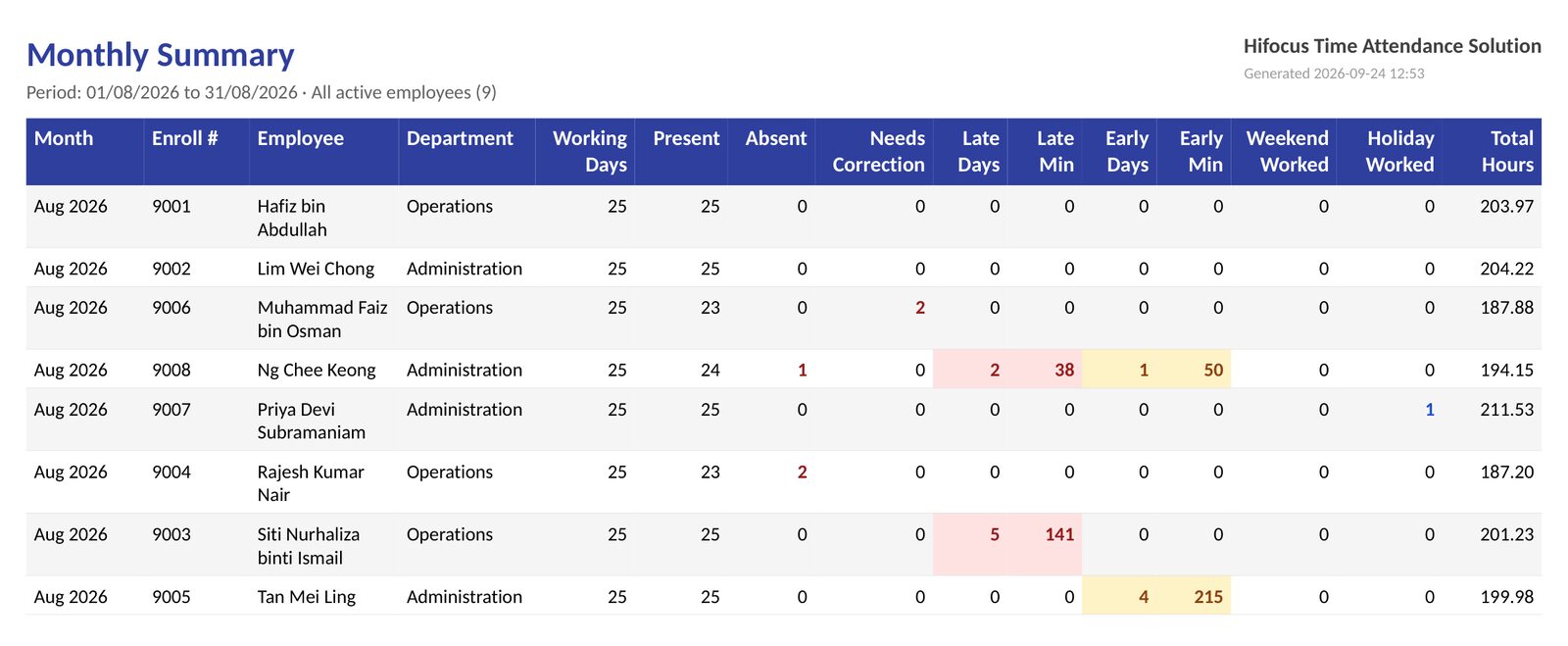
- Monthly Summary — one row per employee per month: working days, present, absent, late days and minutes, early days and minutes, total hours
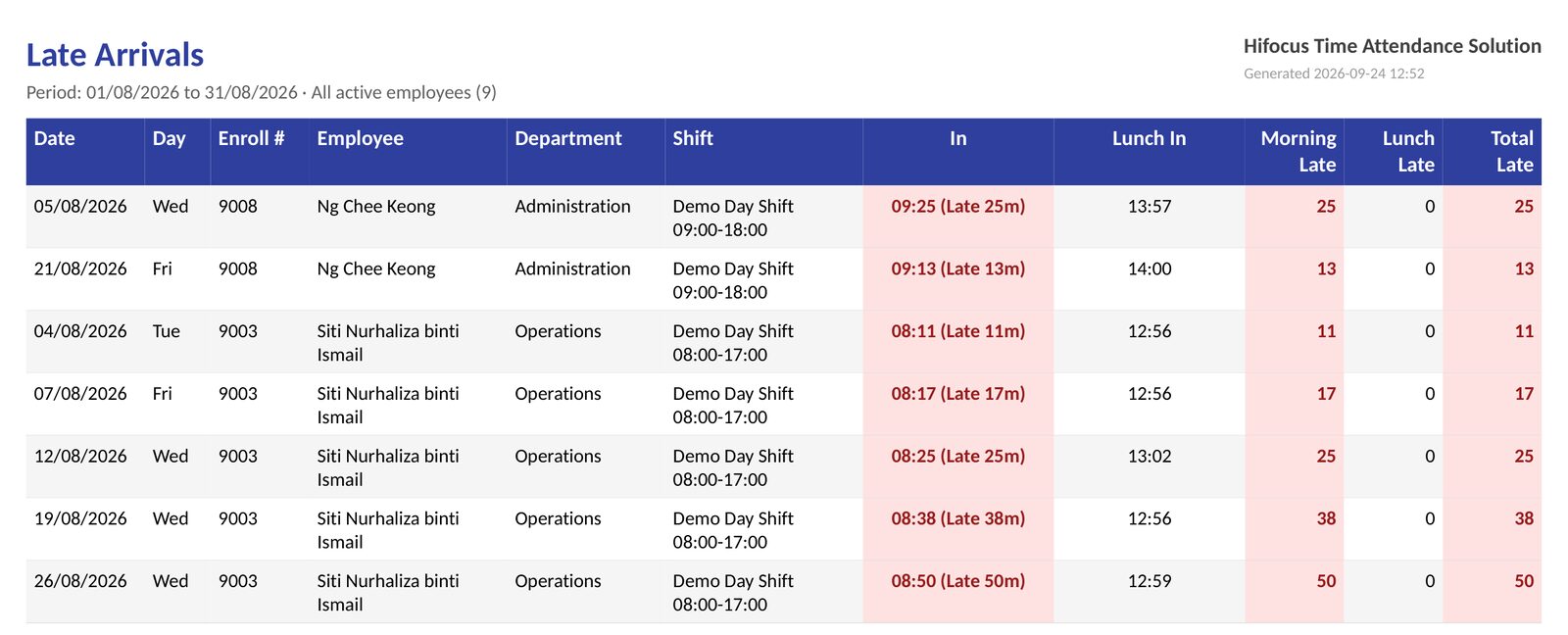
- Late Arrivals — only the days someone was late, with the minutes
- Absence Report — working days with no punches, weekends and holidays excluded
Choose any period, all staff, a department or selected employees, then export to PDF or Excel, or print.

Analytics
Over 7, 30 or 90 days: daily punch volume, what time of day people actually punch, which employees worked the most hours, and which authentication methods are being used. Useful for spotting a terminal nobody uses or a shift that never starts on time.

Data collects automatically every few minutes in the background. If the PC is switched off, the software catches up on the missed punches the next time it runs, so nothing is lost.
This is a record collection and reporting tool, not an HR system. It does not handle leave, payroll, TAP or SCP.
If you need more than that, we build custom software. Tell us what you need.
Sample reports
What Your Payroll Actually Receives
Every report exports as PDF or Excel with your company name on the header.
Tested with the dashboard
Terminals That Work With Our Software
These are the terminals we've tested and installed with the HiFOCUS Attendance Dashboard. If you already have terminals on site, talk to us first: we can usually check compatibility before you replace anything.


Terminals at different doors or branches all report into the same dashboard. ZKTeco and HiFOCUS device support is in development.
Terminals We Supply
Hikvision, ZKTeco, and our own HiFOCUS ET series.
We supply a wider range of terminals than the four above. If you want one that reports into our software, tell us and we'll confirm compatibility before you order.
Which one suits your site depends on headcount, where it's mounted, and whether the same door also needs access control. Ask us and we'll specify it against your site.

HiFOCUS
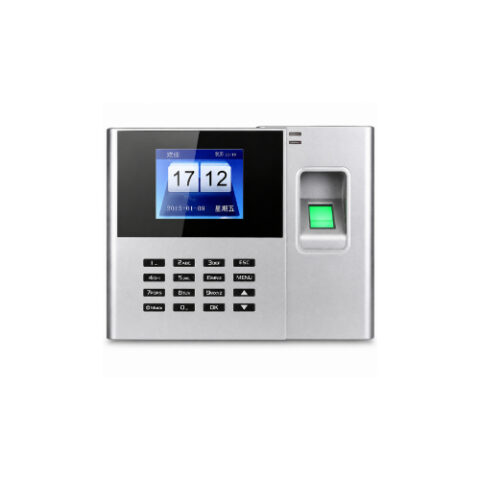
HiFOCUS ET-F6 Cloud Facial & Palm Time Attendance Terminal
HiFOCUS ET-F6 Cloud Facial & Palm Time Attendance Terminal Advanced Cloud-Based Facial & Palm Recognition Time Attendance Terminal Supports Facial Recognition, Palm Recognition, Fingerprint, RFID Card & Password Authentication Cloud Attendance Management with Real-Time Data Synchronization Built-in Wi-Fi, TCP/IP & USB Host Connectivity Fast AI Face & Palm Recognition with High Accuracy Large User Capacity and Attendance Record Storage Supports Employee Attendance & Door Access Control Functions Embedded Linux Operating System for Stable Performance Easy Attendance Report Export and Cloud Management Ideal for Offices, Factories, Schools, Hospitals, Warehouses & Commercial Buildings
HiFOCUS
FX-3C Cloud Fingerprint Time Attendance Terminal
FX-3C Cloud Fingerprint Time Attendance Terminal Cloud-Based Fingerprint Time Attendance Solution High-Speed Optical Fingerprint Recognition Technology Supports Fingerprint, Password & RFID Card Authentication Cloud Attendance Management with Real-Time Data Synchronization Built-in TCP/IP, USB Host & Optional Wi-Fi Connectivity Fast Employee Check-In & Check-Out with Accurate Identification Large User Capacity with High Attendance Record Storage Supports Automatic Attendance Reports & Data Export Easy Installation and User-Friendly Operation Ideal for Offices, Factories, Schools, Warehouses, Retail Stores & Commercial Buildings

HiFOCUS
HiFOCUS ET-F3 Face & Fingerprint Time Attendance Terminal
HiFOCUS ET-F3 Face & Fingerprint Time Attendance Terminal Professional Face & Fingerprint Biometric Time Attendance Terminal Fast Face Recognition & High-Precision Optical Fingerprint Authentication Supports Face Recognition, Fingerprint, Password & RFID Card Verification 2.8-inch High-Resolution Color TFT Display Stores Up to 300 Face Templates, 3,000 Fingerprints & 200,000 Attendance Records Built-in TCP/IP & USB Host with Optional Wi-Fi Connectivity Supports Door Access Control, Electric Lock, Exit Button & Alarm Functions Embedded Linux Operating System for Stable & Reliable Performance Quick Recognition Speed for Efficient Employee Attendance Management Ideal for Offices, Schools, Factories, Warehouses, Hotels & Commercial Buildings

HiFOCUS
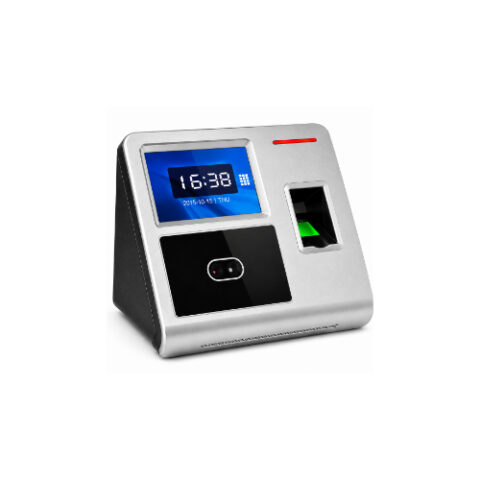
HiFOCUS F350C Cloud 4G Face & Fingerprint Time Attendance Terminal
HiFOCUS F350C Cloud 4G Face & Fingerprint Time Attendance Terminal Professional Cloud-Based Face & Fingerprint Time Attendance Terminal Supports Face Recognition, Fingerprint, RFID Card & Password Authentication Built-in Cloud Connectivity via GPRS, 4G, Wi-Fi & TCP/IP Real-Time Attendance Monitoring and Cloud Data Synchronization High-Speed Face Recognition with Accurate Fingerprint Verification Large User Capacity and Attendance Record Storage Supports Employee Attendance Management & Access Control USB Host for Attendance Report Export and Backup Embedded Linux Operating System for Reliable Performance Ideal for Offices, Factories, Schools, Warehouses, Hospitals & Commercial Buildings
HiFOCUS
F3 Wi-Fi Face & Fingerprint Time Attendance Terminal
F3 Wi-Fi Face & Fingerprint Time Attendance Terminal Advanced Face Recognition & Fingerprint Time Attendance System Fast Contactless Face Verification with Fingerprint Authentication Built-in Wi-Fi & TCP/IP for Easy Network Connectivity High-Speed Identification with Accurate Biometric Recognition Supports Face, Fingerprint, Password & RFID Card Authentication Large Color TFT Display with User-Friendly Interface Automatic Attendance Record Management & Reporting USB Flash Drive Support for Data Backup & Export Suitable for Small, Medium & Large Businesses Ideal for Offices, Factories, Schools, Warehouses & Government Organizations

ZKTeco
ZKTeco MB40VL Access Terminal
The ZKTeco MB40-VL is a next-generation multi-biometric time attendance and access control terminal powered by innovative Visible Light Face Recognition technology. Designed for modern businesses, it combines facial recognition, fingerprint verification, RFID card authentication, and password access into a single intelligent solution. Featuring advanced Deep Learning algorithms, anti-spoofing technology, and 3D Neuron Fingerprint recognition, the MB40-VL delivers fast, accurate, and secure authentication even in dynamic lighting conditions. Key Features Visible Light Face Recognition Technology 3,000 Face Capacity 3,000 Fingerprint Capacity 100,000 Transaction Records Supports Face, Fingerprint, RFID Card & Password Authentication Advanced Anti-Spoofing Technology TCP/IP, Wi-Fi & USB Host Communication Compatible with ZKTime.Net & ZKBioTime Software Ideal For: Offices, Schools, Factories, Warehouses, Retail Stores, Hospitals, Hotels, Government Buildings, and Enterprise Access Control Applications.

ZKTeco
ZKTeco SenseFace7A Face Access Terminal
ZKTeco SenseFace 7A Face Access & Time Attendance Terminal The ZKTeco SenseFace 7A is an enterprise-grade AI-powered multi-biometric access control and time attendance terminal designed for high-security environments. Featuring intelligent visible light facial authentication, in-glass fingerprint technology, RFID card verification, and password authentication, it delivers fast, accurate, and contactless identity verification with advanced anti-spoofing protection. ✔ AI Visible Light Face Recognition with Advanced Anti-Spoofing Technology ✔ Face, In-Glass Fingerprint, RFID Card & Password Authentication ✔ 7" TFT Color Touch Display with 1 MP WDR Binocular Camera ✔ Supports Up to 50,000 Users & 300,000 Transaction Records ✔ Supports Up to 50,000 Face Templates & 10,000 Fingerprints ✔ Face Recognition in Less Than 0.35 Seconds ✔ Built-in Video Intercom with ONVIF & SIP Protocol Support ✔ TCP/IP, RS485, Wiegand & Optional Wi-Fi Connectivity ✔ IP65 Weatherproof Design for Indoor & Outdoor Installation Powered by ZKTeco's latest intelligent facial authentication engine and in-glass fingerprint technology, the SenseFace 7A utilizes an advanced anti-spoofing algorithm to defend against printed photos and video attacks, ensuring highly secure biometric authentication. The integrated video intercom function with ONVIF compatibility enhances visitor communication and seamlessly integrates with modern access control and smart building systems. Professional Supply, Installation, Configuration, Training & After-Sales Support by HiFOCUS Solutions Sdn Bhd, Brunei Darussalam.

ZKTeco
ZKTeco SenseFace 4A Face Access Terminal
ZKTeco SenseFace 4A Face Access & Time Attendance Terminal The ZKTeco SenseFace 4A is a next-generation AI-powered multi-biometric access control and time attendance terminal designed for enterprise security applications. Featuring intelligent visible light facial authentication, in-glass fingerprint technology, RFID card verification, password authentication, and video intercom functionality, it delivers fast, secure, and contactless identity verification with industry-leading anti-spoofing protection. ✔ AI Visible Light Face Recognition with Advanced Anti-Spoofing Technology ✔ Face, In-Glass Fingerprint, RFID Card & Password Authentication ✔ 4.3" TFT Color Touch Display with 1 MP WDR Binocular Camera ✔ Supports up to 6,000 Face Templates ✔ Supports up to 8,000 Fingerprints ✔ Supports up to 8,000 Cards & 200,000 Transaction Records ✔ Face Recognition in Less Than 0.35 Seconds ✔ Built-in Video Intercom with ONVIF & SIP Protocol Support ✔ TCP/IP, RS485, Wiegand & Optional Wi-Fi Connectivity ✔ IP65 Weatherproof Design for Indoor & Outdoor Installation Powered by ZKTeco's intelligent facial authentication engine and in-glass fingerprint technology, the SenseFace 4A effectively prevents spoofing attempts using printed photos or video attacks while providing fast and reliable biometric authentication. The integrated video intercom function with ONVIF compatibility enhances visitor management and seamlessly integrates with modern access control and smart building systems. Professional Supply, Installation, Configuration, Training & After-Sales Support by HiFOCUS Solutions Sdn Bhd, Brunei Darussalam.

ZKTeco
ZKTeco SenseFace 2A Face Access Terminal
ZKTeco SenseFace 2A Multi-Biometric Access Control & Time Attendance Terminal The ZKTeco SenseFace 2A is an intelligent multi-biometric access control and time attendance terminal designed for modern businesses. Featuring AI-powered visible light face recognition, fingerprint verification, RFID card authentication, password login, and video intercom support, it delivers fast, secure, and contactless authentication for offices, factories, schools, hospitals, and commercial buildings. ✔ AI Visible Light Face Recognition Technology ✔ Face, Fingerprint, Card & Password Authentication ✔ 2.4" TFT Color LCD Display with 1 MP WDR Binocular Camera ✔ Supports 1,500 Face Templates & 3,000 Fingerprints ✔ 3,000 Card Capacity & 150,000 Transaction Records ✔ Face Recognition in Less Than 0.35 Seconds ✔ Recognition Distance: 30 cm – 2 m ✔ TCP/IP Communication with Optional Wi-Fi ✔ Video Intercom with SIP Protocol (Version 2.0) ✔ Compatible with ZKBio CVAccess, ZKBio Time & ZKBio Zlink The built-in video intercom function enhances visitor management and communication by supporting SIP protocol, allowing seamless integration with compatible indoor monitors and access control systems. The device also supports multiple communication protocols and AC Push/TA Push conversion for maximum software compatibility. Ideal for enterprise access control, employee attendance management, and smart building security applications. Professional Supply, Installation, Configuration, Training & After-Sales Support by HiFOCUS Solutions Sdn Bhd, Brunei Darussalam.

Hikvision
Hikvision Pro Face Access Terminal DS-K1T673DX
Hikvision DS-K1T673DX Pro Face Access Terminal The Hikvision DS-K1T673DX is a high-performance AI-powered face access control and time attendance terminal designed for enterprise, government, educational, healthcare, and commercial environments. Featuring a 7-inch LCD touch screen, 2 MP wide-angle camera, and advanced deep learning face recognition technology, it delivers fast, secure, and contactless authentication with exceptional accuracy. ✔ 7-inch LCD Touch Screen with 2 MP Wide-Angle Camera ✔ Face Recognition Distance: 0.3 m – 3 m ✔ Recognition Speed: Less than 0.2 Seconds per User ✔ Recognition Accuracy: 99% or Higher ✔ Built-in M1, Felica & DESfire Card Reader ✔ Supports up to 10,000 Face Templates ✔ Supports up to 10,000 Fingerprints (with fingerprint module) ✔ Supports up to 50,000 Cards ✔ Stores up to 150,000 Event Records ✔ Supports Face Mask Detection ✔ Single Person & Multi-Person Recognition (Up to 5 People) ✔ Supports TCP/IP (IPv4 & IPv6), ISAPI & ISUP 5.0 Ideal for modern access control and employee attendance applications, the DS-K1T673DX combines intelligent face recognition, multiple authentication methods, and enterprise-grade security features to provide reliable access management and seamless integration with Hikvision security platforms. Professional Supply, Installation, Configuration, Training & After-Sales Support by HiFOCUS Solutions Sdn Bhd, Brunei Darussalam.

Hikvision
Hikvision Pro Face Access Terminal DS-K1T671MF
Hikvision DS-K1T342MFX Value Series Face Access Terminal The Hikvision DS-K1T342MFX is an intelligent biometric face recognition terminal designed for secure access control and accurate time attendance management. Featuring a 4.3-inch LCD touch screen, 2 MP wide-angle camera, and multiple authentication methods, it provides fast, reliable, and contactless identity verification for offices, factories, schools, retail stores, banks, and commercial buildings. ✔ 4.3-inch LCD Touch Screen with 2 MP Wide-Angle Camera ✔ Multiple Authentication: Face, Fingerprint & M1 Card ✔ Supports up to 1,500 Face Templates ✔ Supports up to 3,000 Fingerprints ✔ Supports up to 3,000 M1 Cards ✔ Stores up to 150,000 Event Records ✔ Face Recognition Distance: 0.3 m – 1.5 m ✔ Recognition Speed: Less than 0.2 Seconds per User ✔ Recognition Accuracy: 99% or Higher ✔ Supports Mask Recognition ✔ Two-Way Audio with Client Software, Indoor Station & Main Station ✔ Supports TCP/IP Networking ✔ Supports ISAPI & ISUP 5.0 Integration ✔ Easy Configuration via Web Client ✔ Built-in M1 Card Reading Module Ideal for modern access control and employee attendance applications, the DS-K1T342MFX combines advanced AI face recognition technology with fingerprint and card authentication, delivering high-speed verification, enterprise-grade security, and seamless integration with Hikvision access control and security management platforms. Professional Supply, Installation, Configuration, Training & After-Sales Support by HiFOCUS Solutions Sdn Bhd, Brunei Darussalam.
Hikvision
Hikvision Value Series Face Access Terminal DS-K1T342MFX-E1 (PoE)
Hikvision Value Series Face Recognition Access Control Terminal DS-K1T342MFX-E1 (PoE) The Hikvision DS-K1T342MFX-E1 is the PoE version of the DS-K1T342MFX, taking power over the network cable and supplying the door lock directly, which removes the need for a separate power point at the door. ✔ 4.3-inch LCD Touch Screen with 2 MP Lens ✔ Face, Fingerprint, MIFARE Card and PIN Authentication ✔ Two-Way Audio ✔ Up to 1,500 Faces, 3,000 Cards and 3,000 Fingerprints ✔ TCP/IP and RS-485 Communication ✔ PoE Powered (37–57 VDC / 0.6 A) or 12 VDC Adapter ✔ Powers One Door Lock Directly (12 VDC / 1 A output) ✔ Access Control & Time Attendance in One Terminal ✔ Remote Door Opening via Hik-Connect, Tamper Alarm, Six Attendance Statuses Professional Supply, Installation, Configuration & Support by HiFOCUS Solutions Sdn Bhd, Brunei Darussalam.

Where Attendance Systems Are Used

Offices
Head office and branch attendance, from single-door offices to multi-floor premises.

Government
Terminals at government buildings, enrolled to the department's own procedure.

Banks
Staff attendance points inside the back-office area, clear of the customer hall.

Schools
Staff attendance for schools and training centres.

Clinics
Contactless face terminals where gloved hands rule out touch.

Supermarkets
Shift attendance for floor and storeroom staff across long opening hours.

Warehouses & Logistics
Mounted clear of forklift traffic at the personnel door.

Remittance
Branch attendance inside the secured staff area.
The Record Completes the Story
- Credential Access control decides who may open the door.
- Barrier Turnstiles make sure one person passes per credential.
- Record Time attendance keeps the record of when they came in.
How it works
From Survey to Monthly Reports
Four steps, and the first one is the one that decides the rest.
-
1
Site Survey
We walk the entrances, not the floor plan — where staff actually come in, how many use each point and what's already on the wall.
-
2
Terminal Schedule
Which entrance, which terminal and how many staff enrol on it, written into the quotation before anything is ordered.
-
3
Installation
Terminals, power, network and cabling, fitted and wired by our own technicians.
-
4
Enrolment and Handover
Staff enrolled with you on site, the software installed and synced, and the person who pulls the reports shown how.
Questions
Before You Ask Us to Quote
No. The terminal stores punches on the device and keeps working if the internet is down. Our software connects over your own network.
A terminal records at the point where it's mounted. Sites with several entrances normally get one per entrance.
We re-enrol them on site, or give them a card or PIN as a backup. Both can run alongside biometrics for the same person.
Yes. Hardware carries 1 year warranty, and we support the software and the terminals after handover.
It's included with the system we install, and there's no monthly subscription. We build and support it ourselves here in Brunei.
Yes. Terminals at different doors or different branches all report into the same dashboard, and every report covers all of them together.
The terminals keep recording. When the PC comes back on, the software collects everything it missed.
Yes. Every report exports as PDF or Excel, for all staff, one department, or selected employees.
Possibly. We've tested four Hikvision models so far, listed above. Send us the model number and we'll tell you honestly whether it will work.
Days with a missing punch are flagged in the Daily Summary so you can see them before payroll is run, rather than discovering the problem at month end.
One page covering the terminals, the software features and sample reports.
Download the brochure (PDF) (opens in a new tab)Tell us your headcount and how many entrances.
We'll specify the terminals, quote the installation and set up the software on your PC.
Brunei sites only.
Mobile & WhatsApp
Office
Business Hours
Monday - Saturday